Skip to content
OmniGuest

OmniGuest AI · Guest communication platform for hotels

Guest communication and hotel operations for OPERA Cloud.

Draft replies with live room rates and availability, turn booking e-mails into OPERA Cloud reservations after your team approves them, and route guest wishes from the web chat — and from WhatsApp and Telegram once you switch their AI on — to the department on duty.

Watch the 8-minute tour
OmniGuest unified inbox with an AI-drafted reply and live availability
modules live today on one guest record
12
integration with Oracle OPERA Cloud: real time in, writeback out
2-way
app languages — each colleague works in their own
8
guest records sent to public AI providers by default
0

Founding Partner Programme

Free for up to 12 months — and we cover Oracle's OHIP costs.

For hotels on Oracle OPERA Cloud: every live module at no cost for six months, twelve when you stay actively involved. Onboarding included. In return, your honest input decides what we build next.

From e-mail to reservation

An agency books by e-mail. Your team checks it once. OPERA has the reservation.

No retyping between the inbox and the PMS — and nothing reaches OPERA Cloud until someone on your team has confirmed it.

  1. 01

    The booking arrives

    In your shared mailbox, as always — Microsoft 365, Gmail or IMAP.

  2. 02

    The AI pre-fills the reservation

    Guest, dates, rooms, rate and notes are read from the e-mail into an OPERA Cloud reservation form beside the mail. Agency references are checked, so nothing is booked twice.

  3. 03

    Your team confirms

    An authorised colleague checks every value and confirms. Only then is the booking created in OPERA Cloud.

  4. 04

    The reply carries the number

    The drafted answer includes the OPERA confirmation number, ready for your team to send.

How the inbox works
Turn a hotel booking e-mail into an OPERA Cloud reservation1:30An agency books two rooms by e-mail: the AI reads it, pre-fills the OPERA Cloud reservation, staff confirm, and the reply carries the confirmation number.

Turn a hotel booking e-mail into an OPERA Cloud reservation

From chat to done

The guest asks in the chat. Housekeeping gets the job. Nobody typed anything in.

The AI concierge doesn't just answer — it turns a wish into a service request for the right department and keeps the guest posted until it is done.

  1. 01

    The guest asks

    In the hotel's web chat, on WhatsApp or Telegram, in their own words and language — nothing new to install.

  2. 02

    The concierge opens the request

    Department, category and priority are set by the AI, the stay and room come from the reservation.

  3. 03

    The team on duty takes it

    Whoever is on duty in housekeeping gets a push notification, and the response deadline starts running.

  4. 04

    The guest hears back

    When someone takes it on and when it is done, the update appears in the guest's chat.

How the guest chat works
Hotel guest chat: AI concierge creates a housekeeping task0:40A guest asks the hotel web chat for a second duvet. The AI concierge creates the service request, housekeeping claims it, the guest sees the update.

Hotel guest chat: AI concierge creates a housekeeping task

The problem

One stay runs through mailboxes, phones, paper and group chats. The guest notices every gap.

The enquiry sits in a shared Outlook folder, the rates in the PMS. The pre-arrival e-mail depends on someone remembering it. A towel request goes from the phone to a sticky note, last night's incident lives in a paper book, and the team coordinates in a WhatsApp group full of guest data. Knowledge lives in people's heads — and leaves with them.

  • Slow answers before arrival

    Read, switch to the PMS, check rates, write, format, send. Ten minutes at best, next morning at worst — and the booking goes elsewhere.

  • Lost requests during the stay

    Wishes arrive by phone, chat and at the desk. Nobody knows who took one on, and the next shift learns about it from the guest.

  • Tools that don't know your hotel

    Consumer messengers and public chatbots can't see the reservation, the rate code or the pet policy — and they keep guest data on someone else's servers.

The guest journey

Before, during and after the stay — on one guest record.

Each stage has its own modules. They share the guest, the reservation and the history, so the night shift sees what the reservations team promised.

  1. Before the stay

    Win the booking, prepare the arrival.

    Enquiries answered with live rates from your PMS, booking mails turned into reservations, confirmation, pre-arrival and check-in welcome e-mails sent on time.

  2. During the stay

    Wishes tracked, every shift informed.

    A branded chat on the guest's phone that turns wishes into service requests on its own, WhatsApp and Telegram in the same inbox, requests routed to whoever is on duty, a logbook the next shift confirms, and lost-and-found matches suggested for staff to confirm.

  3. After the stay

    Bring the guest back.

    A thank-you after departure and newsletters to the lists guests chose to join, built from your own design.

  4. Behind every stay

    One guest record, one team.

    Profiles and reservations from your PMS, a private AI assistant that knows the hotel, and a staff chat instead of the WhatsApp group.

Multilingual by default

Your team works in its own language. Your guests write in theirs.

Eight app languages

English, German, French, Spanish, Italian, Thai, Japanese and Simplified Chinese. Each colleague picks their own, with dates and numbers in the format they know.

  • English
  • Deutsch
  • Français
  • Español
  • Italiano
  • ไทย
  • 日本語
  • 简体中文

Guests write in their own language

The concierge replies in the language the guest writes in, service requests arrive with a translation, and any chat message can be shown in the reader's language with one click.

What ships today

Twelve modules across the stay, on one guest record.

Every screenshot below is the live product with anonymised sample data — not a mock-up.

Before the stay

01Email, understood

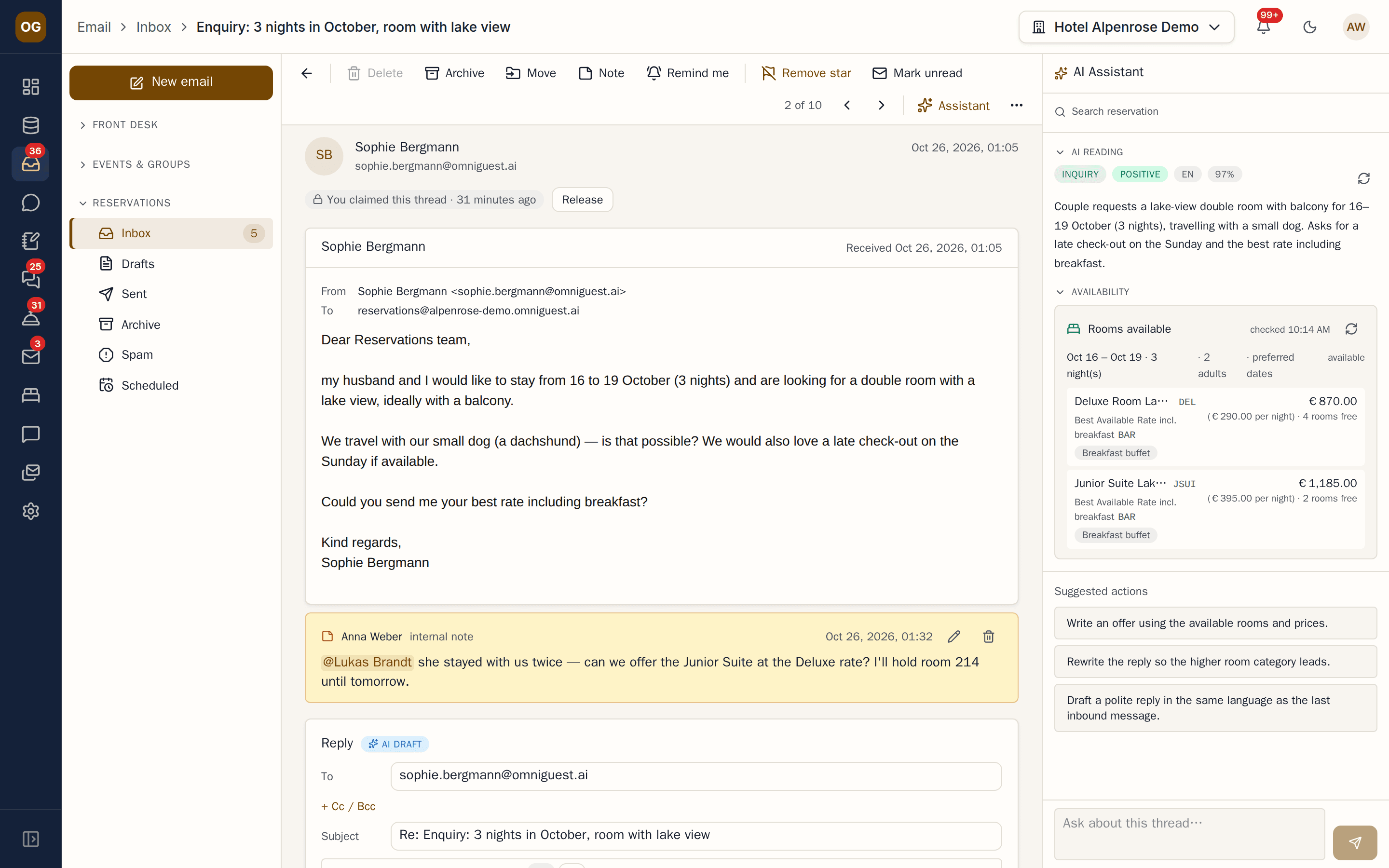
Unified Inbox

Live

Gmail, Microsoft 365 and IMAP in one hotel inbox. Every request categorised, room enquiries drafted with live rates and availability from OPERA Cloud — and booking mails turned into OPERA Cloud reservations once your team confirms them.

  • Drafts with real rates, not guesses
  • Categorised on arrival
  • Booking mails become OPERA reservations
Explore Unified Inbox
OmniGuest unified inbox showing a reservation enquiry with the AI-drafted reply and live room availability

02Pre-arrival to post-stay, with approval

Guest Messages

Live

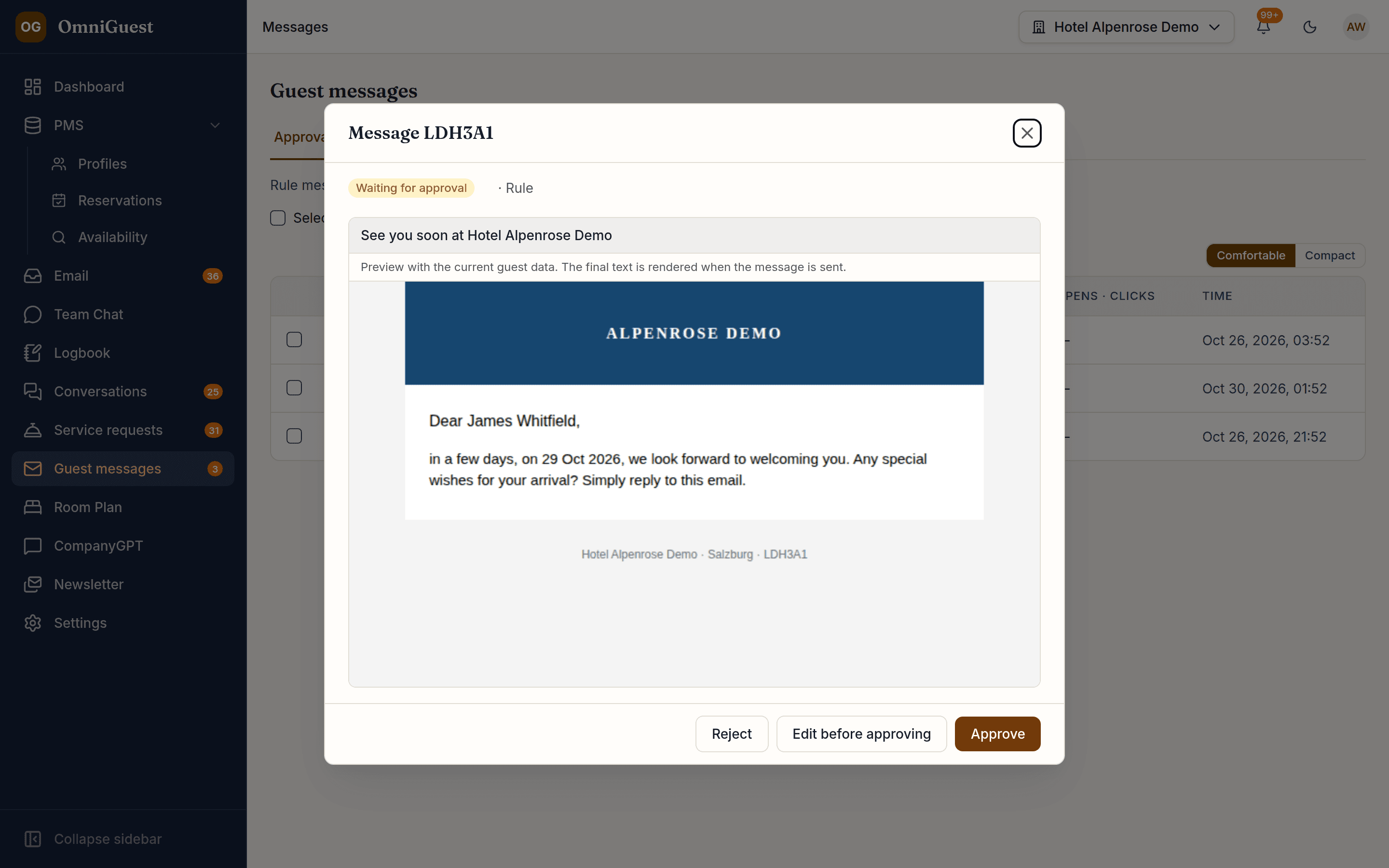
Confirmation, pre-arrival reminder, a welcome e-mail the moment the guest checks in and a thank-you after check-out — triggered by your PMS, sent in the guest's language and approved before they go, until you switch on automatic sending.

  • Welcome at check-in, reminder before, thank-you after
  • Triggered by the PMS, timed in hotel time
  • Approve, edit or reject
Explore Guest Messages
Pre-arrival e-mail waiting for approval, previewed with the guest's current reservation data

During the stay

03AI concierge, human hand-off

Guest Chat

Live

A branded web chat per reservation, answered by an AI concierge that turns guest wishes into service requests on its own, asks for what is missing and hands over to your team when confidence drops — with the hotel's WhatsApp and Telegram in the same inbox, where the concierge answers once the hotel switches it on.

  • Wishes become service requests — automatically
  • Your brand on the guest's phone
  • Confidence-based escalation
Explore Guest Chat
Conversations inbox with web and Telegram chats; the AI concierge resolves a late check-out request end to end

04WhatsApp Business for hotels

WhatsApp

Live

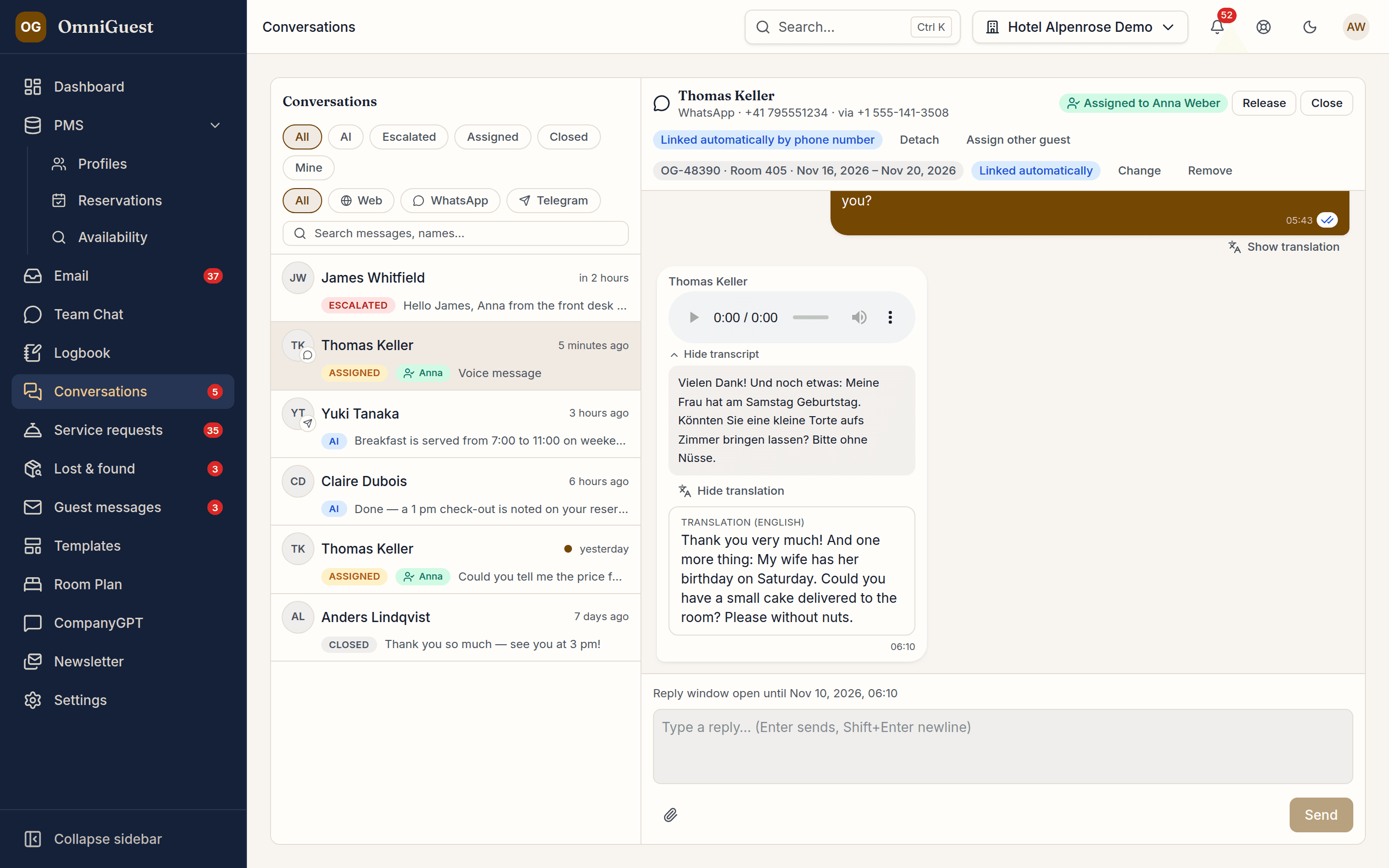
Guests message your hotel's own WhatsApp number and the AI concierge or the team answers from the same conversation inbox as web chat and Telegram — with read ticks, voice messages transcribed and translated, the guest and booking linked automatically, and Meta-approved templates to reply even after 24 hours.

  • One inbox for every channel
  • Ticks you can trust
  • Photos, documents, voice messages, locations
Explore WhatsApp
WhatsApp conversation in the OmniGuest inbox: a guest's voice message with transcript and English translation, the guest and the upcoming reservation linked automatically

05Guest wishes, routed to whoever is on duty

Service Requests

Live

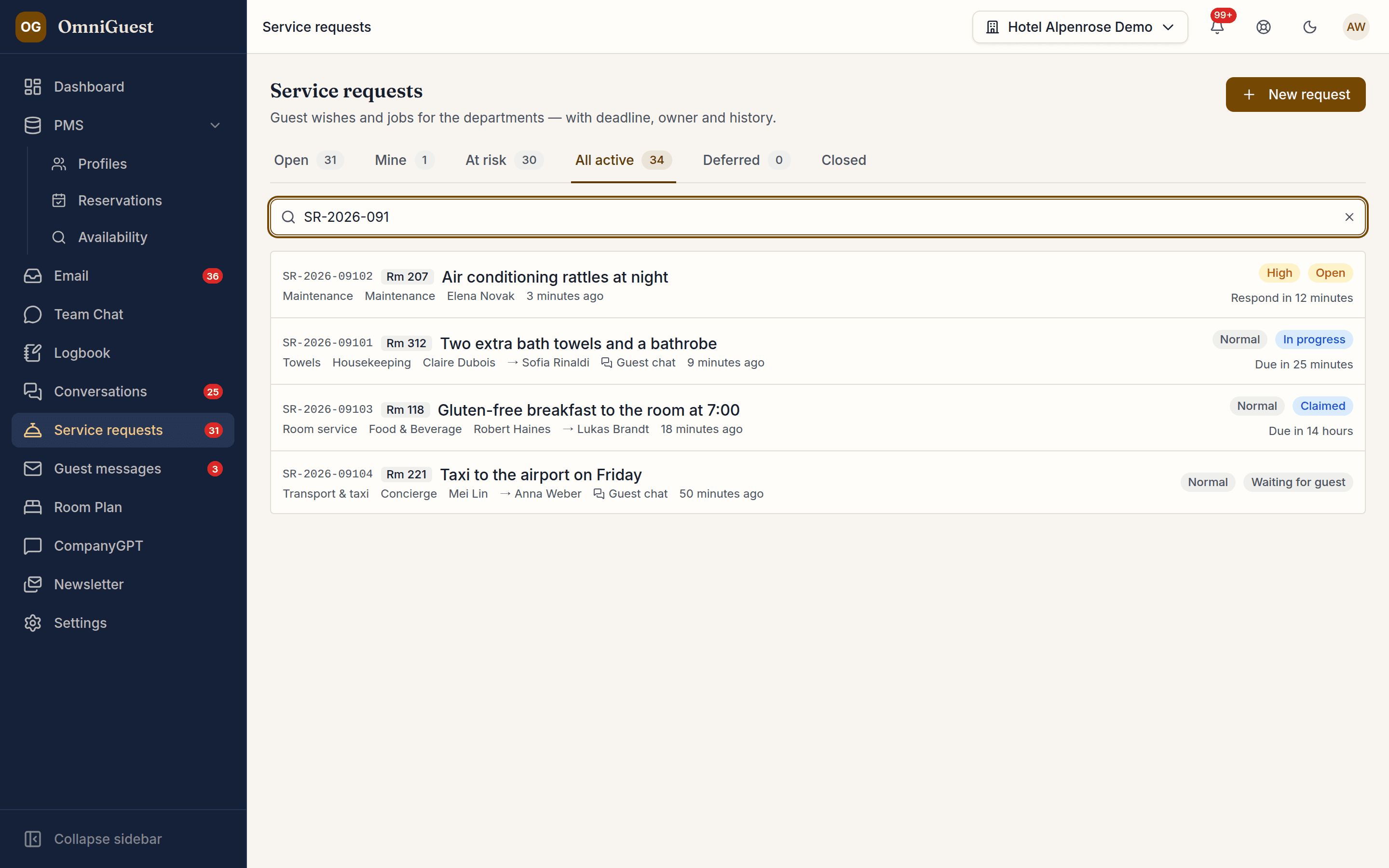
Towels, a taxi, a rattling air-con: wishes from the guest chat become tickets on their own — from WhatsApp and Telegram too once the hotel switches their AI on — calls and walk-ins are logged in seconds — routed to the department on duty, with deadlines, escalation and updates back to the guest.

  • Routed to whoever is on duty
  • AI triage and translation
  • Logged in seconds at the desk
Explore Service Requests
Service requests list with tickets for housekeeping, maintenance, room service and concierge, owners and deadlines

06Shift handover without the paper book

Duty Logbook

Live

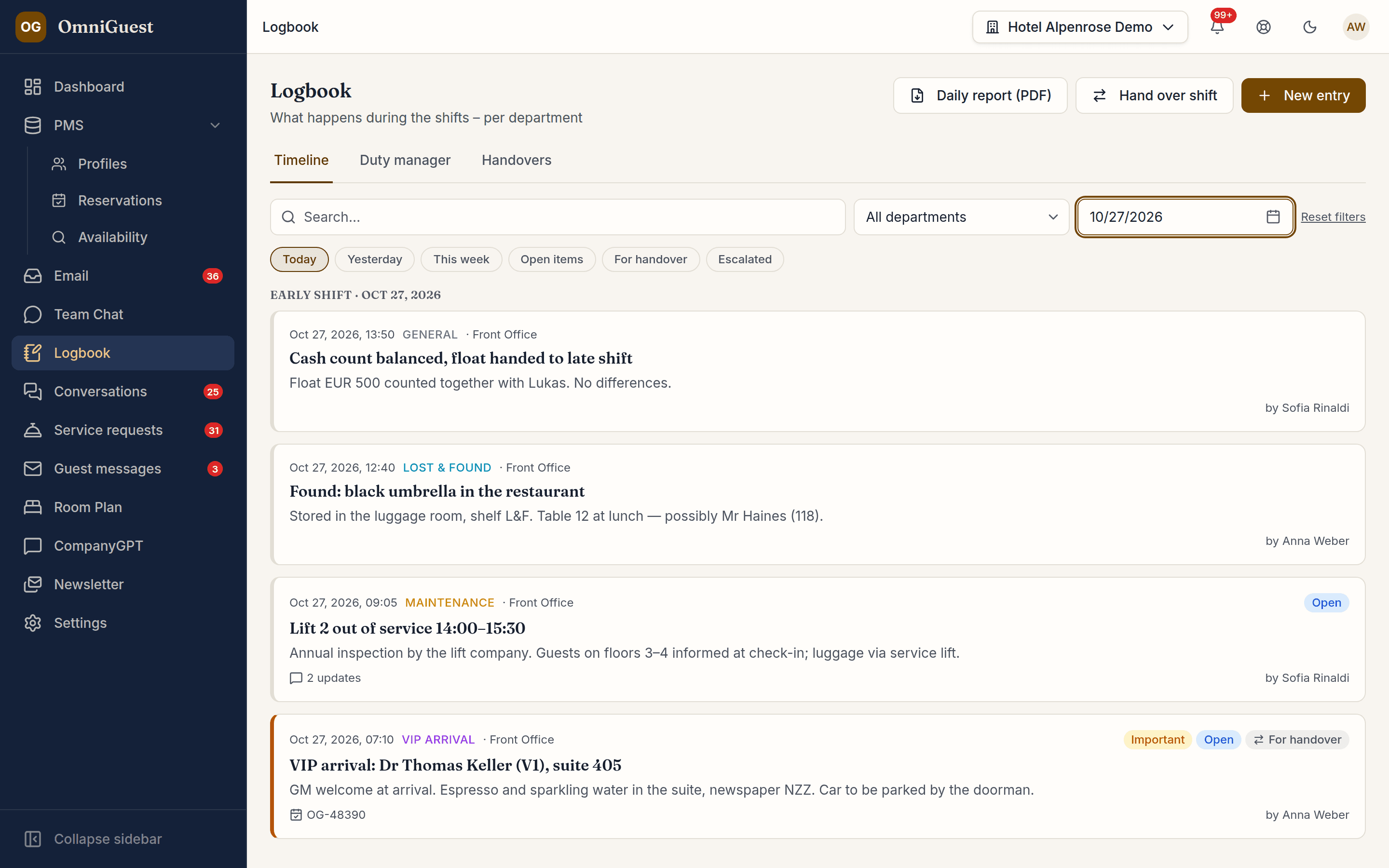
The front-office log book, digital: entries per department and shift, handovers the next shift confirms, an AI-drafted shift summary and a daily report as PDF.

  • Linked to the guest and the room
  • Handover with acknowledgement
  • Updates on every entry
Explore Duty Logbook
Duty logbook timeline with a VIP arrival marked for handover, a maintenance note and lost property

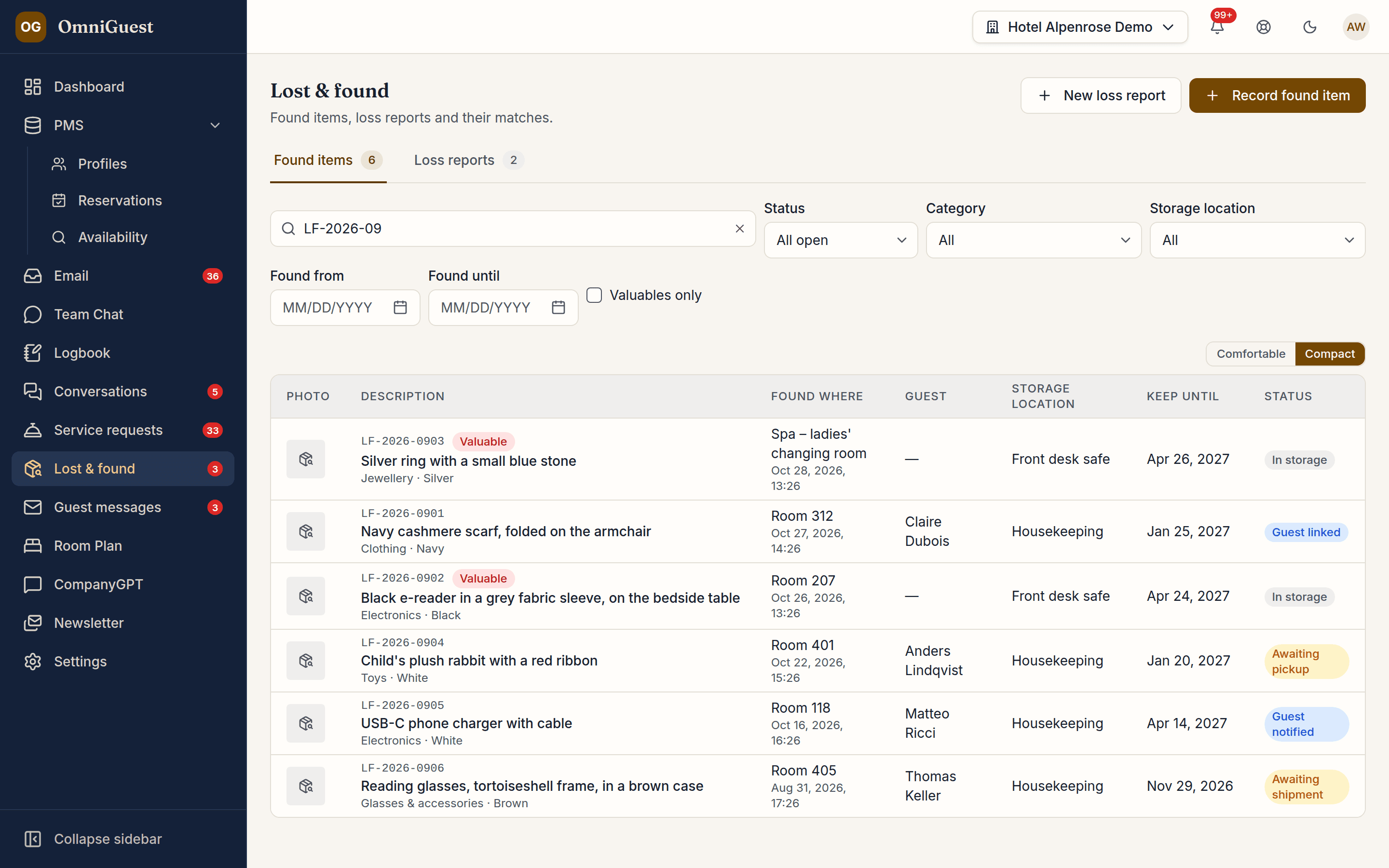
07Found items back with their owners

Lost & Found

Live

Record a found item in seconds on the phone: the room number suggests the guest, the AI describes it from the photos, and OmniGuest suggests matches with loss reports from staff, the guest chat and the inbox for your team to confirm.

  • Recorded in seconds on the phone
  • The AI describes what it sees
  • Loss reports from every channel
Explore Lost & Found
Lost & Found list with found items, their rooms, linked guests and status from stored to awaiting pickup

After the stay

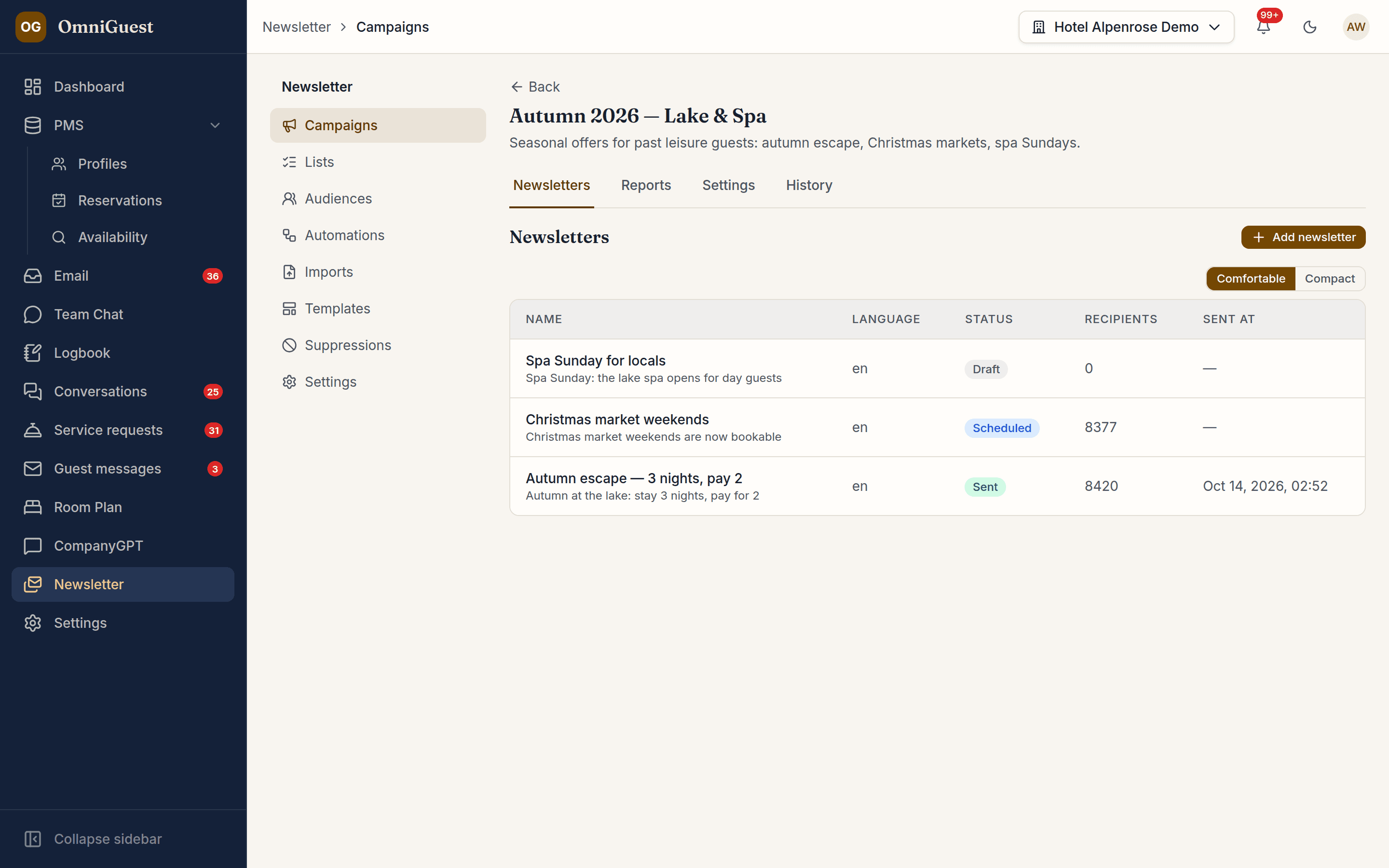
08Marketing that matches your brand

Newsletter

Live

Campaigns, lists, double opt-in and four-eyes approval by default — with an AI editor that reproduces your existing newsletter design from a PDF or image.

  • Template reproduction from PDF or image
  • Lists guests opt into
  • Reports that answer the only question: did it work?
Explore Newsletter
Newsletter campaign with sent, scheduled and draft newsletters, languages and recipient counts

Behind every stay

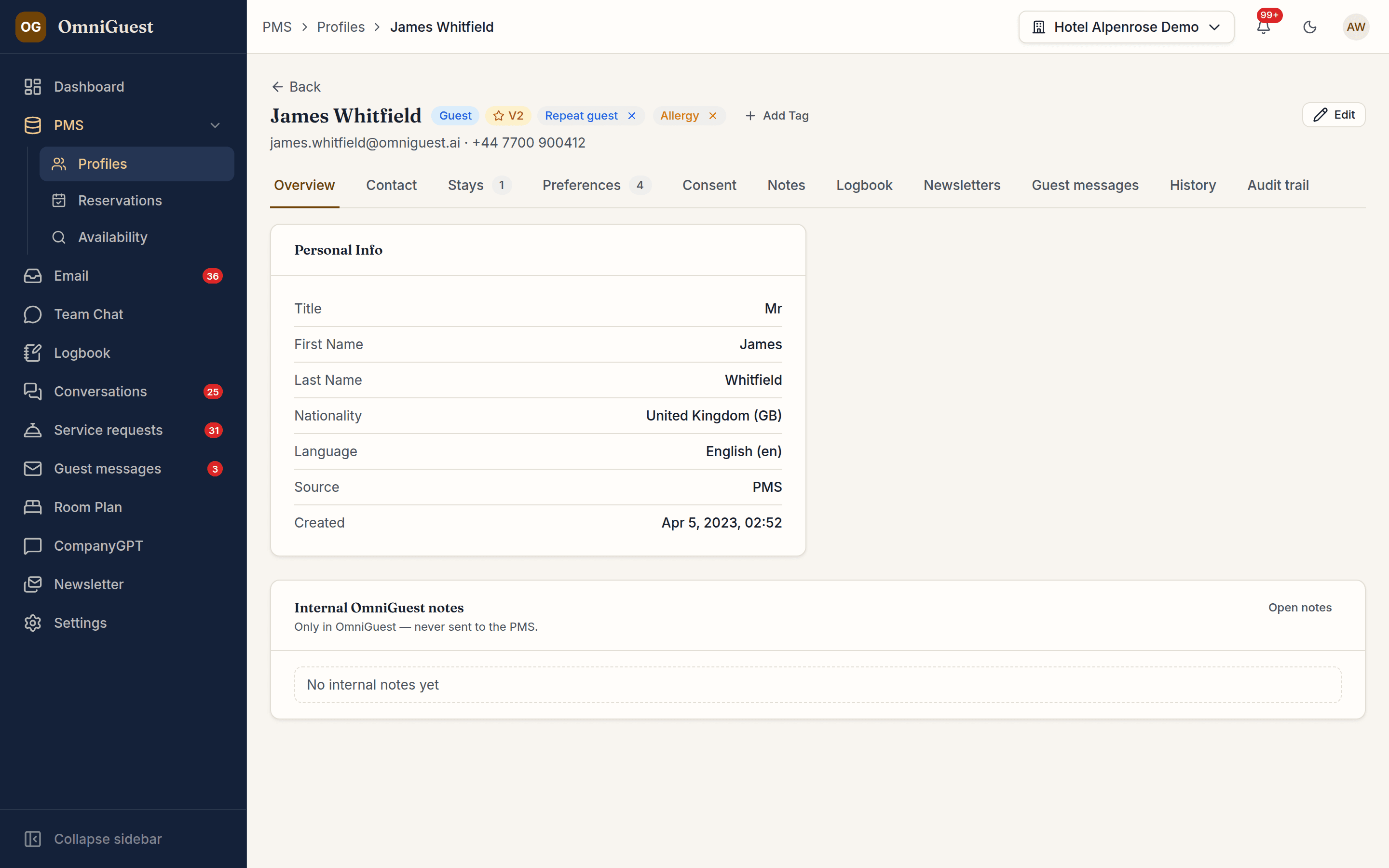
09Profiles & reservations, PMS-native

Guest CRM

Live

Two-way with Oracle OPERA Cloud: profiles, reservations, stays and availability in real time, changes written back — with OmniGuest tags, segments and notes layered on top, never overwritten.

  • Two-way with Oracle OPERA Cloud
  • Preferences that follow the guest
  • Availability and rates on demand
Explore Guest CRM
Guest profile with stays, reservations, preferences and communication history

10CompanyGPT

AI Assistant

Live

A ChatGPT-style hotel AI assistant that reads your hotel's documents and looks up reservations — hosted privately, never trained on your data.

  • Knows the hotel, not the internet
  • @mention a reservation or a guest
  • House rules for every AI in the hotel
Explore AI Assistant
CompanyGPT chat answering a staff question with hotel knowledge and a reservation lookup

11Employee chat for hospitality teams

Staff Chat

Live

The WhatsApp replacement for your teams: departments, announcement channels, voice notes with transcription and reservation cards — as an installable app.

  • Installable, push-enabled, no app store
  • Voice notes, transcribed
  • Reservation cards instead of screenshots
Explore Staff Chat
Staff chat with department channels and a reservation card

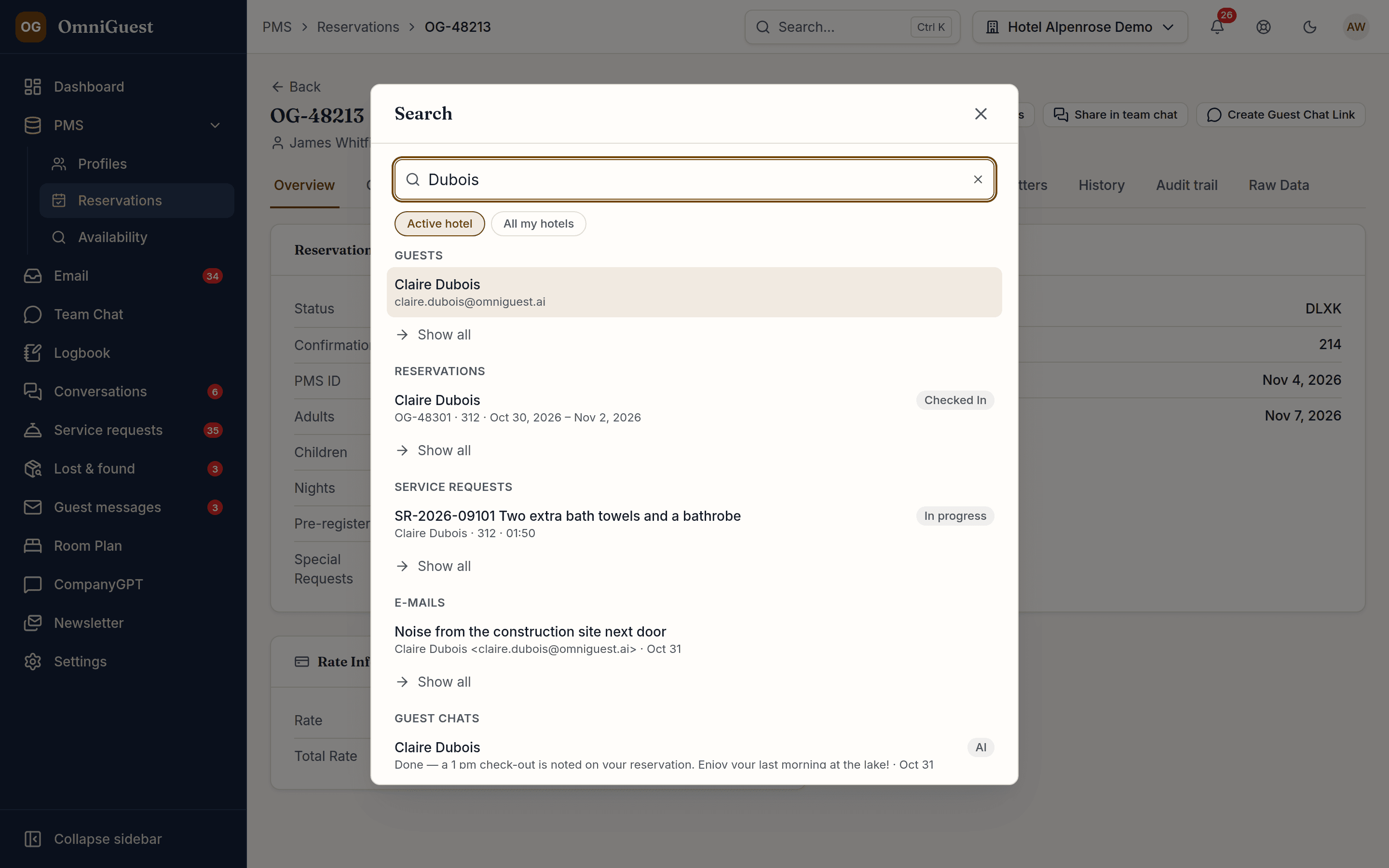
12One search box for the whole hotel

Universal Search

Live

Guests, reservations, service requests, e-mails, guest chats, lost & found, the logbook and hotel knowledge from one search box — open it anywhere with ⌘K or Ctrl+K.

  • Everything the hotel works with
  • Keyboard first, everywhere
  • All my hotels, in one go
Explore Universal Search
Command palette searching for a guest name, with matches in guests, reservations, service requests, e-mails and guest chats

How it works

Connect the PMS and your mailboxes. Switch on the modules you need.

  1. 01

    Connect your PMS

    Oracle OPERA Cloud streams events in real time through OHIP, and OmniGuest writes changes back once you switch writeback on. Reservations and profiles appear in OmniGuest within minutes of go-live.

  2. 02

    Connect mailboxes, channels and teams

    Microsoft 365 or Gmail with OAuth, any other mailbox over IMAP, a secure web chat link per reservation, the hotel's WhatsApp number and Telegram. Set up departments and roles, upload policies and brand guidelines to the knowledge base, and write house rules the AI follows.

  3. 03

    Work the whole stay from one place

    Enquiries arrive with drafted replies, guest messages wait for approval, wishes from the guest chat become service requests for whoever is on duty, the logbook carries the shift. Your team stays in control, and everything lands on the guest's profile.

Integrations

Native to your PMS. At home in your mailbox.

All integrations

Property Management Systems

  • OPERA Cloud
  • ProtelSoon
  • ApaleoSoon
  • StayNTouchSoon

E-mail

  • Microsoft 365 / Exchange Online
  • Gmail / Google Workspace
  • IMAP / SMTP
  • Amazon SES

Messaging channels

  • Web Guest Chat
  • Telegram
  • WhatsApp Business
  • LINESoon

AI & search

  • Private language models
  • Vision & documents
  • Speech-to-text
  • Full-text search

AI apps (MCP)

  • ChatGPT
  • Claude
  • Other MCP apps

Security & privacy

Built for European hotels that take guest data seriously.

Tenant isolation, private AI in Europe, roles per hotel and an audit trail are how the platform is built today — not add-ons.

Read the security overview
  • Schema per enterprise

    Every hotel group gets its own database schema; guest records never share a table with another group.

  • Private AI, hosted in Europe

    Language, vision and speech models run on OmniGuest infrastructure. By default nothing goes to public AI providers, and nothing is used for training.

  • Passkeys and 2FA

    Phishing-resistant login with WebAuthn passkeys, optional authenticator-app or e-mail codes, custom roles per hotel.

  • Append-only audit log

    Who changed what and when — every PMS writeback, booking, rule and permission change, with a history per reservation and a CSV export.

How we build

Built with hotels, released only when it works on a real shift.

Every module on this site runs in production and was shaped by reservations teams, not by a slide deck. We show what ships today, list what comes next on the roadmap, and never overwrite what your PMS knows. Guest data stays in your enterprise schema; AI runs on our own infrastructure in Europe.

On the roadmap

Coming 2027
  • Guest Journey, extended

    Guest Messages already sends confirmation, pre-arrival, check-in welcome and post-stay e-mails. Next: more message types across the stay and more channels than e-mail.

  • Upselling

    Room upgrades, early check-in, spa and F&B offers in pre-arrival messages — priced from live availability.

  • MICE & Groups

    AI parsing of event requests, a proposal builder, a client portal with e-signature and live function-space availability.

  • Payments

    Card-on-file, advance purchase and deposit links with PMS writeback — designed to meet PCI-DSS SAQ-A-EP requirements.

  • More messaging

    More on the conversation foundation that already powers web chat, WhatsApp and Telegram.

  • Dashboard & Analytics

    Each hotel already has a dashboard with arrivals, departures, in-house guests, occupancy and booking sources. Next: response times, enquiry-to-booking conversion, newsletter performance and AI usage per hotel, brand and enterprise.

Full roadmap

See your own hotel's stay, end to end.

Bring an anonymised enquiry from your hotel to the demo — or use one from our demo hotel. We drop it into a sandbox PMS and show you the draft — then follow the guest through pre-arrival, chat, service requests and the logbook. Live, in 30 minutes.