04WhatsApp Business for hotels
Your guests already use WhatsApp. Now your front desk does too — without a phone on the counter.
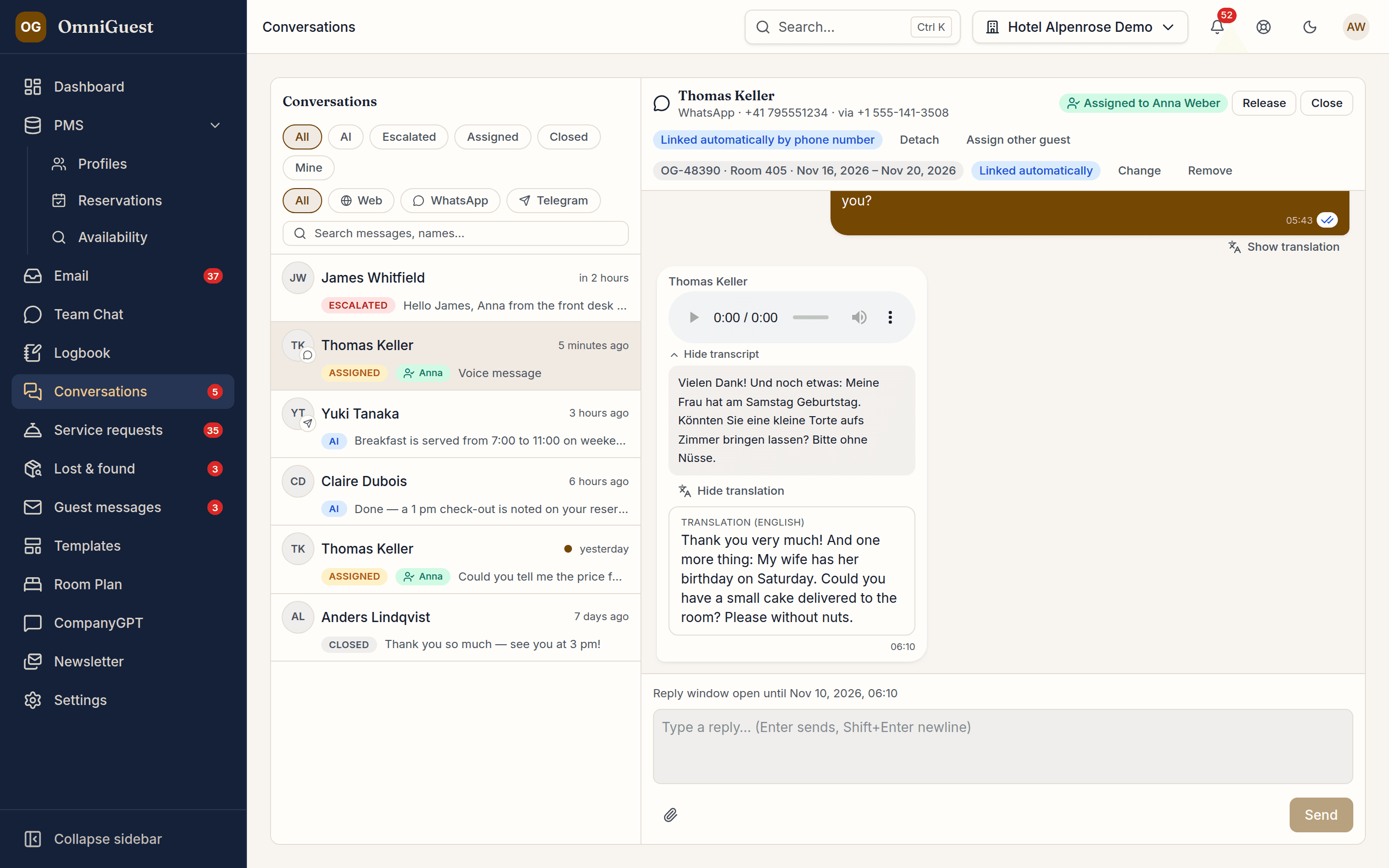
Connect the hotel's WhatsApp Business number once and every message lands in OmniGuest's conversation inbox, next to web chat and Telegram. The team replies from any desk, sees when a message was delivered and read, and knows which guest and which reservation they are talking to — no shared phone, no personal numbers, no screenshots of chats.
- Number
- Your hotel's own
- Voice messages
- Transcribed & translated
- Guest & booking
- Linked automatically
See it in action
Watch it in the app
Narrated walkthroughs recorded in OmniGuest with our demo hotel, with English subtitles.
One inbox for every channel
WhatsApp, web chat and Telegram share one conversation list with the same filters, assignment and status. Claim a conversation, hand it to a colleague or close it — the guest only sees the hotel.
Ticks you can trust
Every reply shows sent, delivered and read as the guest's WhatsApp reports them, and a failed message says why. When a colleague opens the conversation, the guest sees it was read, and sees “typing…” while the answer is written.
Photos, documents, voice messages, locations
Guests send whatever they would send a friend: images, PDFs, videos, voice messages, their location, a reaction. Every file is virus-scanned before anyone opens it. The team replies with text and a photo or a document.
Voice messages, transcribed and translated
A voice message arrives with a written transcript, so nobody has to listen at a busy desk. One click translates it into the reader's language. Transcription runs on OmniGuest's own infrastructure in Europe, not at a public AI provider.
The guest and the booking, linked automatically
OmniGuest matches the sender's phone number with your guest profiles — only when exactly one guest of this hotel fits — and links the stay that matters: in house, arriving soon or just departed. The link is marked as automatic and staff can change it with one click.
The 24-hour window in plain sight
WhatsApp lets a business reply freely for 24 hours after the guest's last message. Each conversation shows when that window closes, and the guest's next message opens it again.
The AI concierge on WhatsApp
If the hotel switches it on, the concierge answers WhatsApp guests from your knowledge base, turns wishes into service requests and asks for any detail it still needs. Its first message says it is an AI. Staff take over at any time; “Hand back to AI” or closing the conversation returns it to the concierge.
Reply after 24 hours with approved templates
Once the 24-hour window has closed, the team still answers in the same conversation with a template Meta has reviewed and approved. WhatsApp in OmniGuest is for conversations guests start themselves — marketing stays with the e-mail newsletter.
Your number, your Meta account
Each hotel keeps its own WhatsApp number and its own WhatsApp Business account and pays Meta directly — no reseller margin in between; OmniGuest shows a monthly counter. OmniGuest connects to the WhatsApp Cloud API directly and sets the number up for you; guests at two hotels of the same group get two separate conversations.
Questions
WhatsApp, answered.
Does WhatsApp work with OPERA Cloud?
Yes. OmniGuest matches the sender's phone number with the guest profiles it keeps in sync with OPERA Cloud — only when exactly one guest of the hotel fits — and links the stay that matters, so the team sees the booking next to the chat.
Do we need a separate WhatsApp phone at the front desk?
No. The hotel's WhatsApp Business number is connected through the WhatsApp Cloud API, and the team answers from any desk in OmniGuest's conversation inbox, next to web chat and Telegram.
Can we send marketing messages on WhatsApp?
No. WhatsApp in OmniGuest is for conversations guests start themselves, with Meta-approved templates to reply after the 24-hour window. Marketing stays with the e-mail newsletter.
Who pays for WhatsApp?
Each hotel keeps its own WhatsApp Business account and pays Meta directly, without a reseller margin. OmniGuest shows a monthly counter.
Works with
- WhatsApp Business (Cloud API)
- Guest Chat
- Service Requests
- Guest CRM
See your own hotel's stay, end to end.
Bring an anonymised enquiry from your hotel to the demo — or use one from our demo hotel. We drop it into a sandbox PMS and show you the draft — then follow the guest through pre-arrival, chat, service requests and the logbook. Live, in 30 minutes.